Section I - How to Install JEdit
1. Download “JDK 6 Update 16”
- from http://java.sun.com/javase/downloads/index.jsp
- select your platform (e.g. “Windows”)

2. download "jdk-6u16-windows-i586.exe", install It.
3. Download JEdit, install it
- from http://www.jedit.org/
- choose the platform you used (e.g. Windows)
Section II - How to install python 3.1.1
a. download python 3.1.1 from http://www.python.org/download/
b. install it at c:\Python31
c. right-click “My Computer”, choose “Properties”
d. choose “Advanced” tab -> “Environmental variable” button
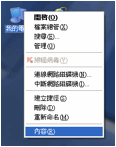

e. click “Path”, click “Edit”

f. ADD these words at the end of the 2nd textbox:
;”c:\python31”

Section III - How to run Python program (*.py)
1. open jEdit, then SAVE YOUR FILE IMMEDIATELY
- The file name must end with .py (e.g. my file is called aabc.py)
- Remember the path you save the file (e.g. I save it in c:\prog)


2. Type in a program, save it
3. (In Windows) choose Start->Run; then type in “cmd”
4. Run it (an example is as shown in the figure below)
- (In DOS) Go to the folder where you stored your file (e.g. cd “c:\prog”)
- (in DOS) type “python”
- (in >>>) type “ from (your filename) import * ” (e.g. from aabc import *)
- (in >>>) run your function
